 Ethan+
How to Claim Your Business in ChatGPT Business Hub (and Get the Blue Check)
ChatGPT already has a listing for your business. Business Hub is how you take it over. Here is the whole process, the two approvals in it, and the fine print to read before you hit claim.
- Published
- November 25, 2026
- Reading time
- 14 min read
- Author
- Ethan Rogers
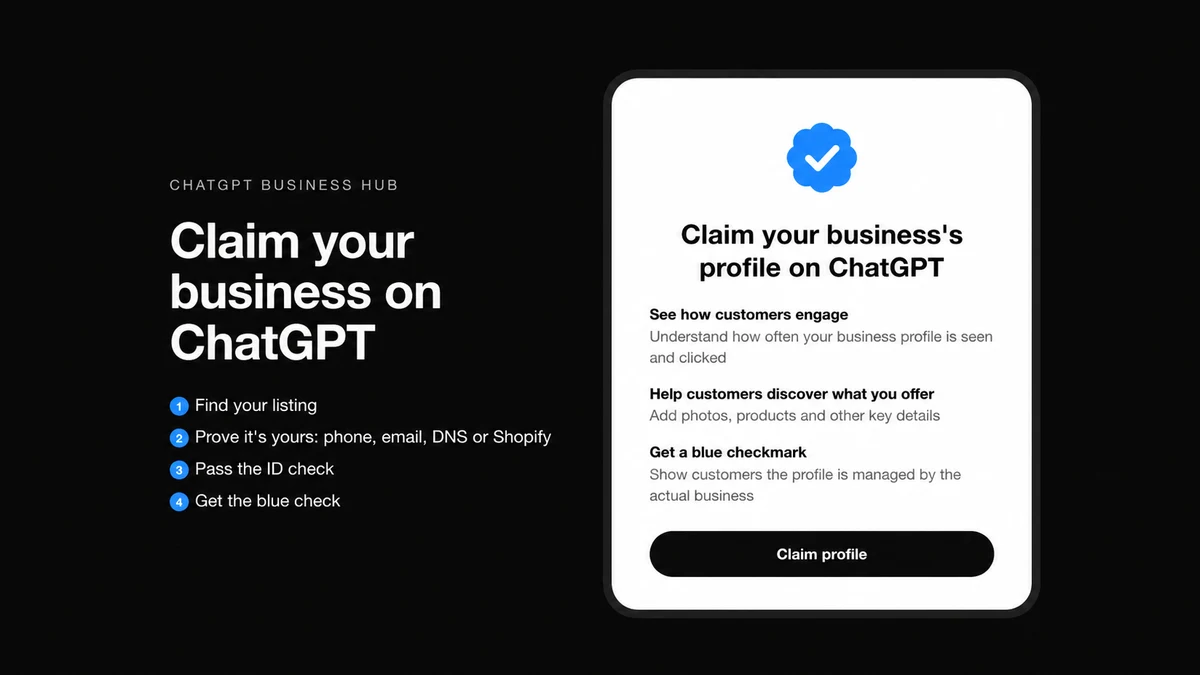
ChatGPT already has a listing for your business. You did not make it and you cannot turn it off. When someone asks ChatGPT for a bike shop in Duluth or a bookkeeping tool for freelancers, the answer can link to a profile page with your name, address, phone number and website on it, pulled together from whatever OpenAI could find.
On November 10, 2026, OpenAI opened a way to take that listing over. It is called Business Hub, it is free, and it is in beta. You claim the profile, prove it is yours, pass an identity check, and get a blue check plus some numbers on how often ChatGPT shows you.
If you have set up a Google Business Profile, the idea is familiar. The process is not. There are two separate approvals, one of them is a government ID check on a real person, and a few of the terms are permanent. I went through OpenAI's setup docs, its terms and the accounts of people who finished the process in the first two weeks. This is everything in order, with the parts OpenAI has not confirmed marked as such.
The whole thing in one paragraph: go to chatgpt.com/business-hub, find your listing and select it. Prove you are connected to it with a code to the listing's phone or email, a DNS record on your domain, or your Shopify login. Wait for OpenAI to approve the claim. Then complete an identity check with a government ID and your legal business details, and wait for a second approval. The blue check shows up after the second one.
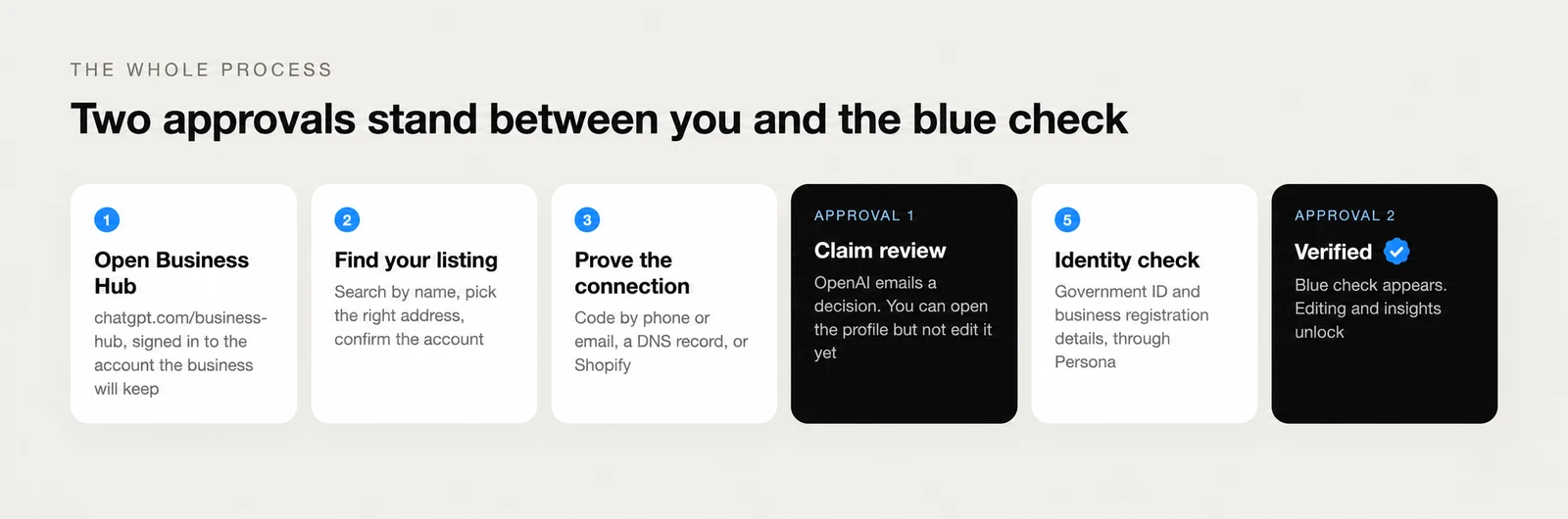
Two approvals, not one. Most of the confusion about this process comes from people thinking they are done after the first.
What Business Hub actually is
Business Hub is the dashboard. The program around it is called Businesses in ChatGPT, and the thing you end up managing gets called a ChatGPT business profile or business listing depending on who is writing. All the same thing.
Per OpenAI's announcement, a verified business gets:
- Control of its details. The help page lists the website, description, category, logo, cover photo, and delivery and return policies.
- Insights. Mentions, website clicks and discovery topics for the last 28 days.
- A blue check, so people can tell the business manages the profile itself.
- A product feed, with prices and availability, if you sell products.
- A Business Agent, a labeled chat that answers questions about you. Only eligible US ecommerce and online service businesses get this one.
It is easy to confuse with three other OpenAI products. You need none of them:
- ChatGPT Business is the paid team plan.
- Ads in ChatGPT is advertising. OpenAI says claiming, publishing an agent and buying ads are separate, and that ads do not affect ChatGPT's independent answers.
- API organization verification is the ID check developers do to use certain OpenAI models. It has nothing to do with your listing.
Why bother
OpenAI says ChatGPT reaches 1.2 billion people a week, and a lot of them now ask it where to go and what to buy. BrightLocal's consumer research found the share of people using ChatGPT and other AI tools for local business recommendations went from 6% to 45% in a year.
The listing exists either way. OpenAI's terms say it can create and show a profile from information it is entitled to use "regardless of whether you claim, manage, or cease managing it." So the real choice is not whether you have a ChatGPT profile. It is whether anyone at your company is looking at it.
Claiming gets you three things: you can fix what it says, people can see it is really you, and you finally get a number for how often ChatGPT is putting you in front of someone.
What it does not get you is more recommendations. OpenAI says plainly that claiming "doesn't guarantee increased visibility or give you direct control over ChatGPT's independent recommendations." Think of it as accuracy and measurement. Whether ChatGPT recommends you still comes down to what it can read about you everywhere else.
How it compares to Google Business Profile
Same job, different platform. The two big differences are the ID check on a person and how little you can edit so far.
| ChatGPT Business Hub | Google Business Profile | |
|---|---|---|
| Shows up in | ChatGPT answers, local results and the profile page | Google Search and Maps |
| Who can claim | Online businesses can claim or add a listing. Local stores and restaurants can only claim an existing US listing. | Businesses with a location or a service area |
| How you prove it | Code to the listing's phone or email, a DNS record, or Shopify. You choose from what your listing supports. | Phone, text, email, video or mail. Google picks. |
| ID check on a person | Yes, a separate step through Persona | Not a standard step |
| Review time | Varies. Reports run from seconds to days, twice. | Up to 5 business days, per Google |
| Cost | Free at launch | Free |
| What you can edit | Website, description, category, logo, cover photo, delivery and return policies. Every change is reviewed. | Hours, services, photos, posts, booking links and more |
| Reviews | None | Customer reviews with owner replies |
| Data | Mentions, website clicks, discovery topics for 28 days | Searches, views, calls, directions, clicks |
Do not let your Google profile slide because of this. People who have claimed ChatGPT listings report that the address, phone number and star rating ChatGPT already had matched their Google listing. OpenAI has not said where its data comes from, but in practice the two look connected, and Google is still where most of that data starts.
Get these ready first
Almost every failed attempt I read about came down to something missing or not matching. Ten minutes of prep saves a few days of waiting.
- A ChatGPT account the business will own long term. A free account is reported to work. The claim stays with whichever account made it, and OpenAI documents no way to move it. Do not use an employee's personal login, and do not use your agency's.
- One way to prove the connection. The phone or email on the listing, access to your domain's DNS, or your Shopify admin.
- A government ID for an owner or authorized officer, and a phone with a camera.
- Your exact legal name. If the sign says Northline Bike Repair but the registration says Northline Cycles LLC, the legal name is Northline Cycles LLC. The brand goes in the "doing business as" field.
- Your registration or tax number. For a US business that is the EIN. The form's placeholder is in EIN format, 12-1234567.
- Your registered address and your physical address. People who finished the check report that PO boxes were rejected.
A note on the EIN letter, since it comes up a lot. OpenAI's wording is that you "may need a government-issued ID, business registration information, and proof that you're authorized to represent the business." Every US account I found had people typing in the EIN and legal name, with no upload. Uploads have been reported in some cases outside the US. Keep the IRS letter (CP 575, or the 147C if you lost it) open anyway. It shows your legal name and EIN exactly as the IRS has them, and an exact match is the whole game.
Step 1: Find your listing
Sign in with the account the business will keep. Go to chatgpt.com/business-hub, or open Business Hub from the ChatGPT sidebar, and search for your business name.
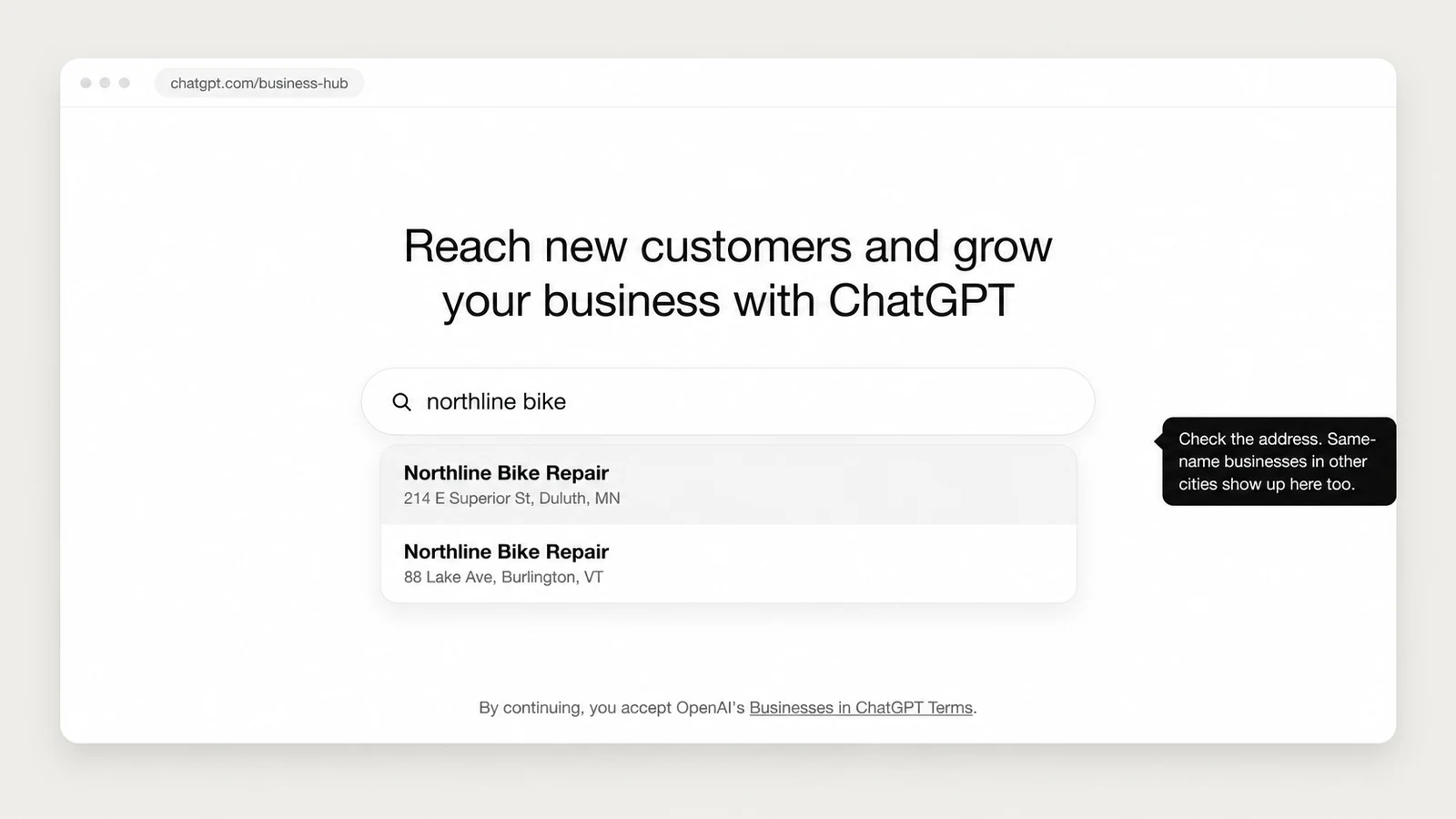
Sample business. Same-name businesses in other cities show up in the same results.
Step 2: Pick the right one and confirm the account
Select the result with your address, not just your name. ChatGPT then asks which account will manage the business, and continuing accepts the Businesses in ChatGPT Terms.
Three things can stop you here:
- Your business is not in the results. OpenAI says local stores and restaurants "can currently claim only an existing U.S. listing." Eligible online businesses may get an option to add one.
- It says Contact support. The listing is locked. Select it to request access from OpenAI.
- Someone already claimed it. Open the profile, choose the more options menu (•••), then Dispute ownership.
Step 3: Prove you are connected to the business
You get up to four methods, and only the ones your listing supports appear.
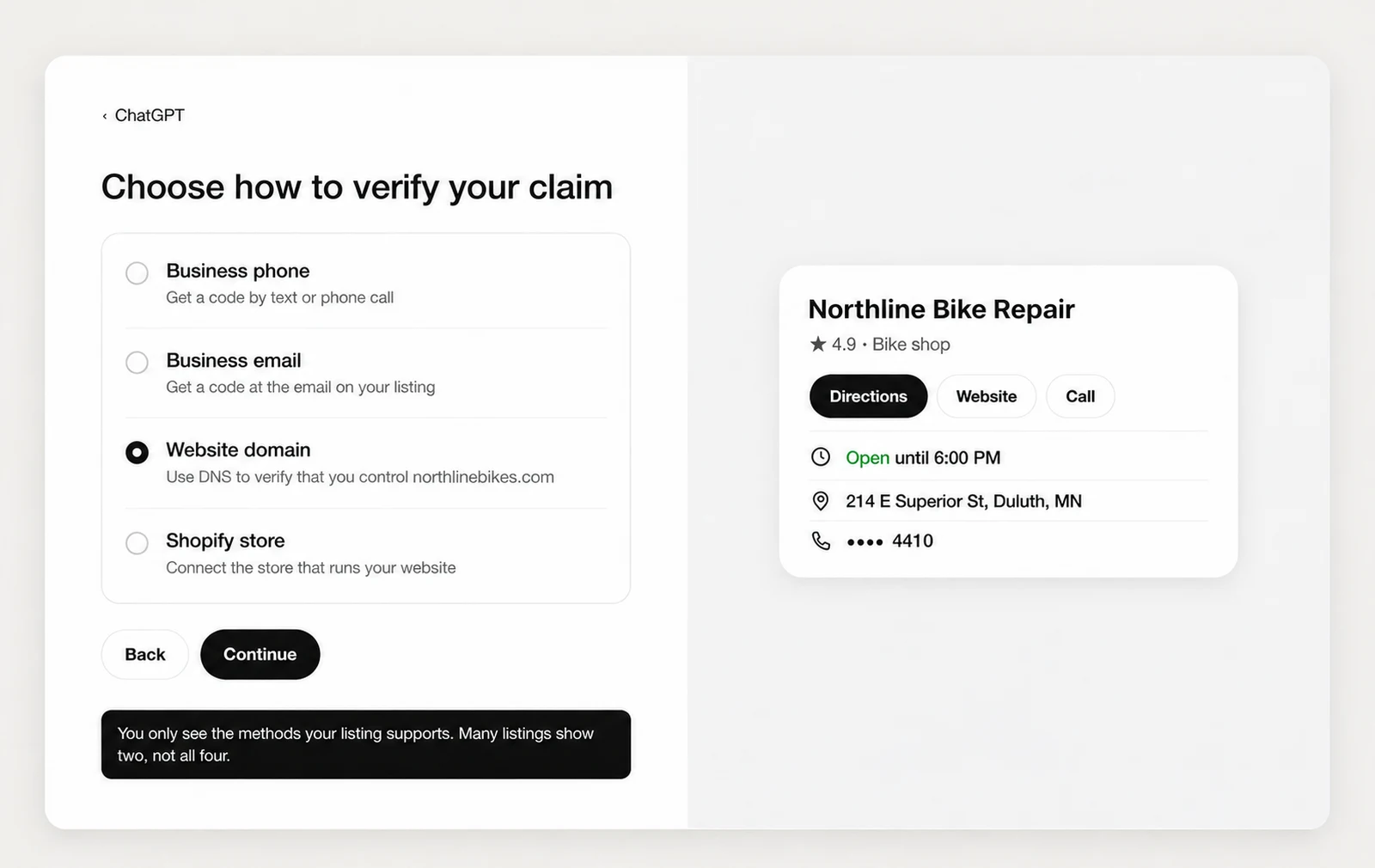
Sample business. Which options you see depends on what is on your listing.
- Business phone. Pick a text or an automated call, select Get code and enter it. It goes to the number on the listing, shown with only the last four digits.
- Business email. Select Get code and enter what arrives at the email tied to the business.
- Website domain. Add a DNS record ChatGPT gives you. This is the one to use if the listed phone number is wrong or lands in a phone tree.
- Shopify store. Select Connect Shopify, review the permissions and sign in.
If a code never shows up, switch methods without leaving the flow. One agency reported that backing out after a failed text code put the listing on a waitlist.
The DNS method, done right
If you have a website and someone who can touch its DNS, this is usually the cleanest route. ChatGPT gives you a TXT record with a type, a host and a value. Add it wherever your DNS lives (Cloudflare, GoDaddy, Squarespace, your registrar), then come back and select Verify domain.
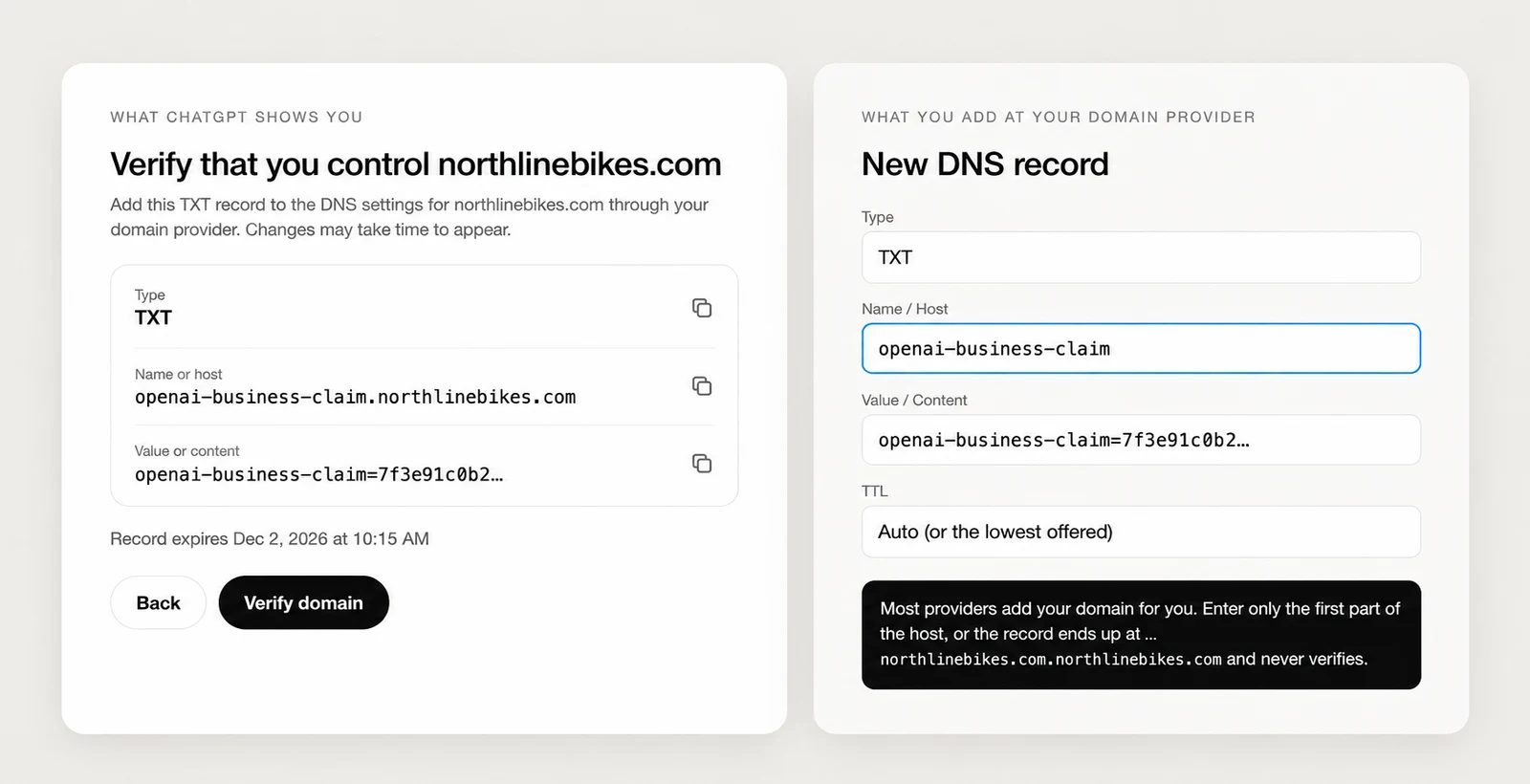
Sample values. Copy your own host and value from Business Hub.
Where it goes wrong:
- Typing instead of copying. Use the copy buttons. One wrong character and it fails.
- The doubled domain. Most DNS providers append your domain to the host for you. Paste the full host and the record ends up at openai-business-claim.northlinebikes.com.northlinebikes.com, which never verifies. Put in only the first part.
- The clock. The record has an expiry, reported at about 24 hours. Miss it and you restart the domain step with a new value.
The host has been reported as openai-business-claim when claiming an existing listing and openai-business-profile when adding a new one. Go by what your screen says.
Step 4: Wait for the claim review
OpenAI reviews the claim and emails you a decision or a request for more information. The screen shows three stages: claim received, review in progress, decision reached. You can cancel while it is pending. OpenAI only says the time varies, and reports from the first two weeks range from about 20 seconds to four days.
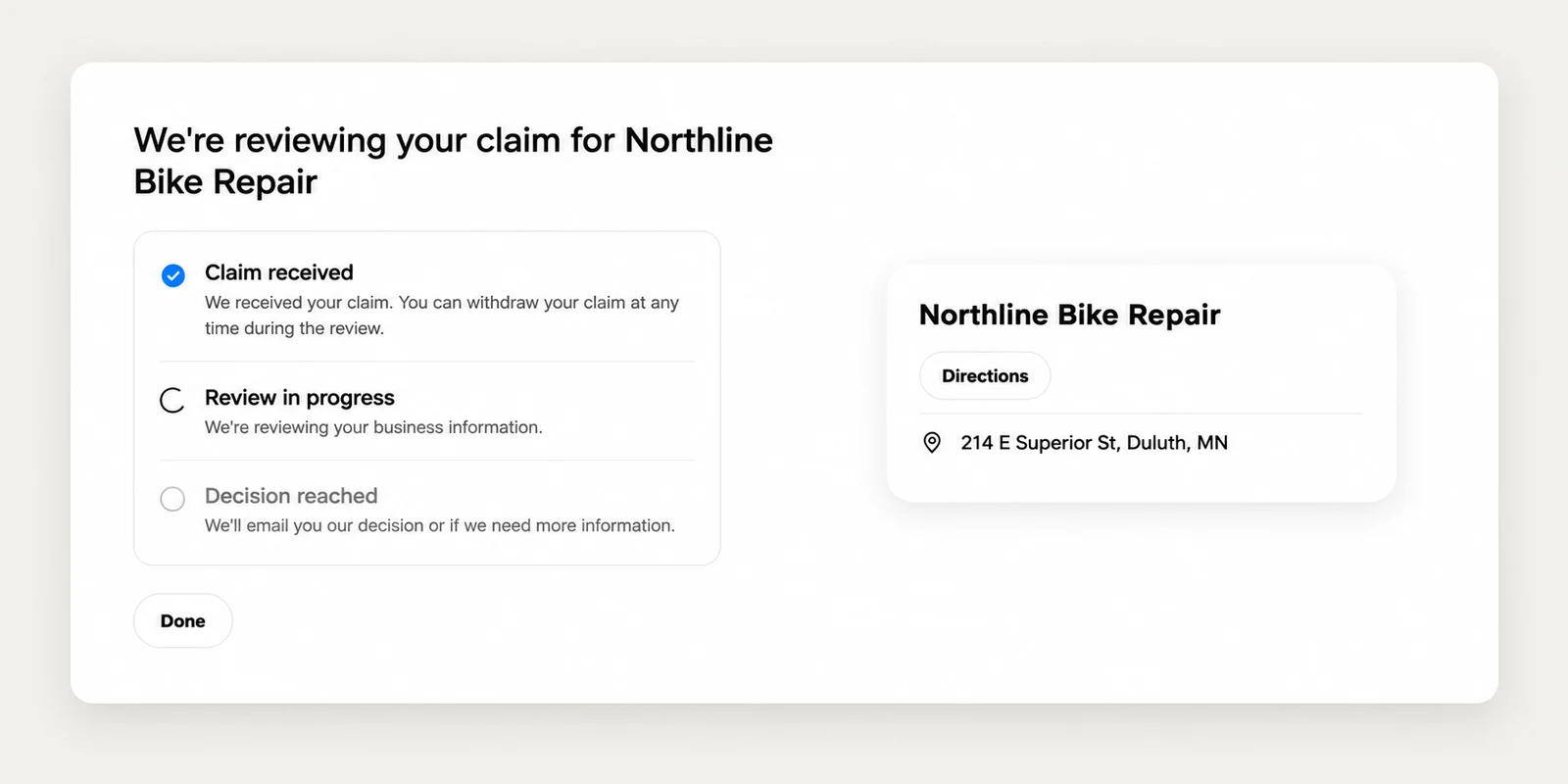
Sample business. You can cancel the claim while it is still under review.
Step 5: Pass the identity check
This is the step that surprises people. An approved claim gets you into the profile, but it is locked: no edits, no insights, no product feed until identity verification goes through. OpenAI uses Persona, an identity verification company, for this. Open Business, select your profile and look for the prompt on the overview.
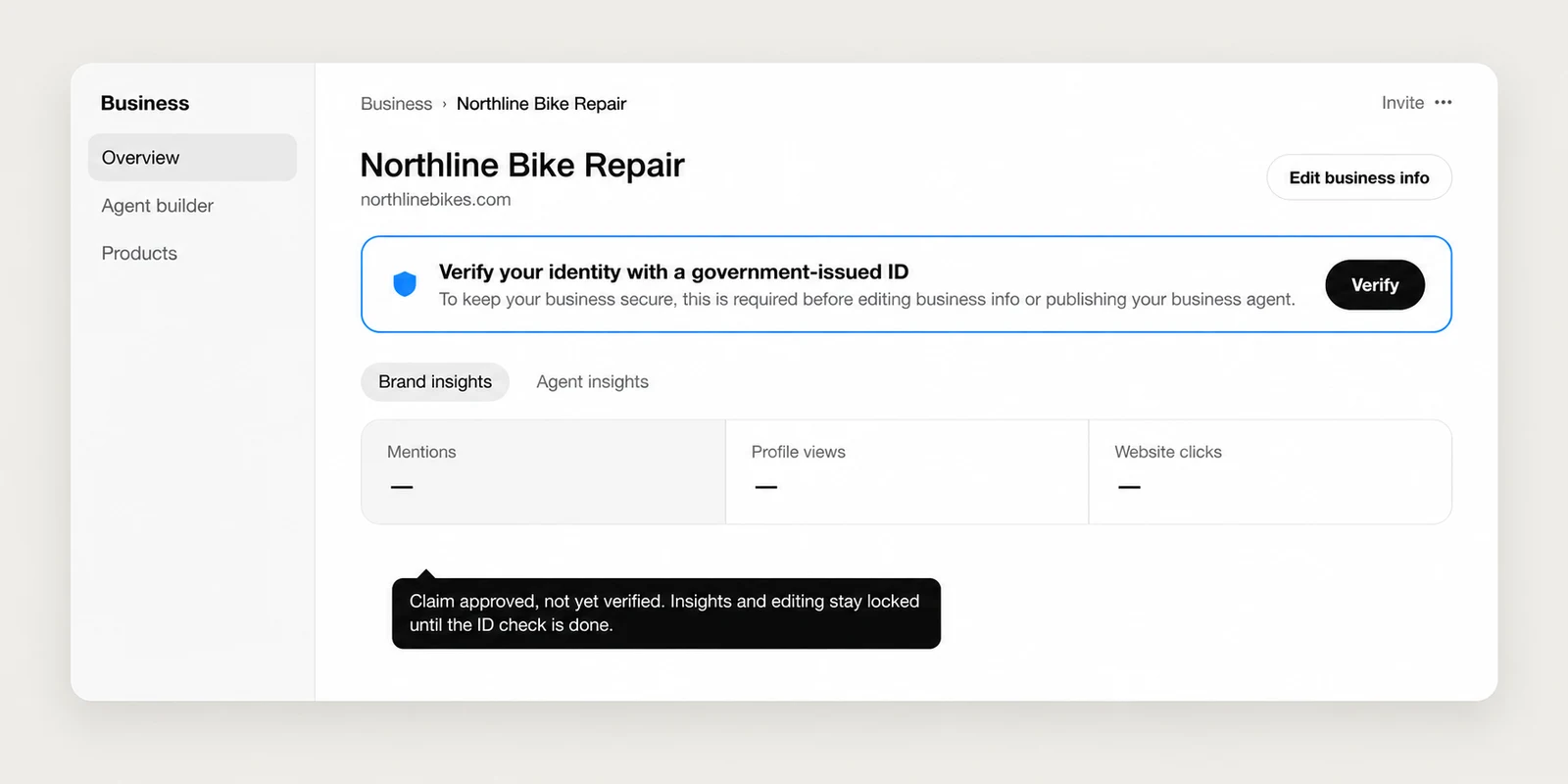
After the first approval. Everything useful stays locked until the identity check clears.
OpenAI's own description is one sentence about ID, registration information and proof of authority. People who have done it, including teams at Search Engine Journal and Hive Digital, describe three parts, usually done on a phone after scanning a QR code:
- A photo of your ID. Driver's license or passport, both sides if it is a card.
- A selfie. A face scan matched against the ID photo. OpenAI's help page does not mention it, but several people who finished the check do.
- Business details. Legal name, doing business as, country, sole proprietor or entity, registration or tax number, website and addresses.
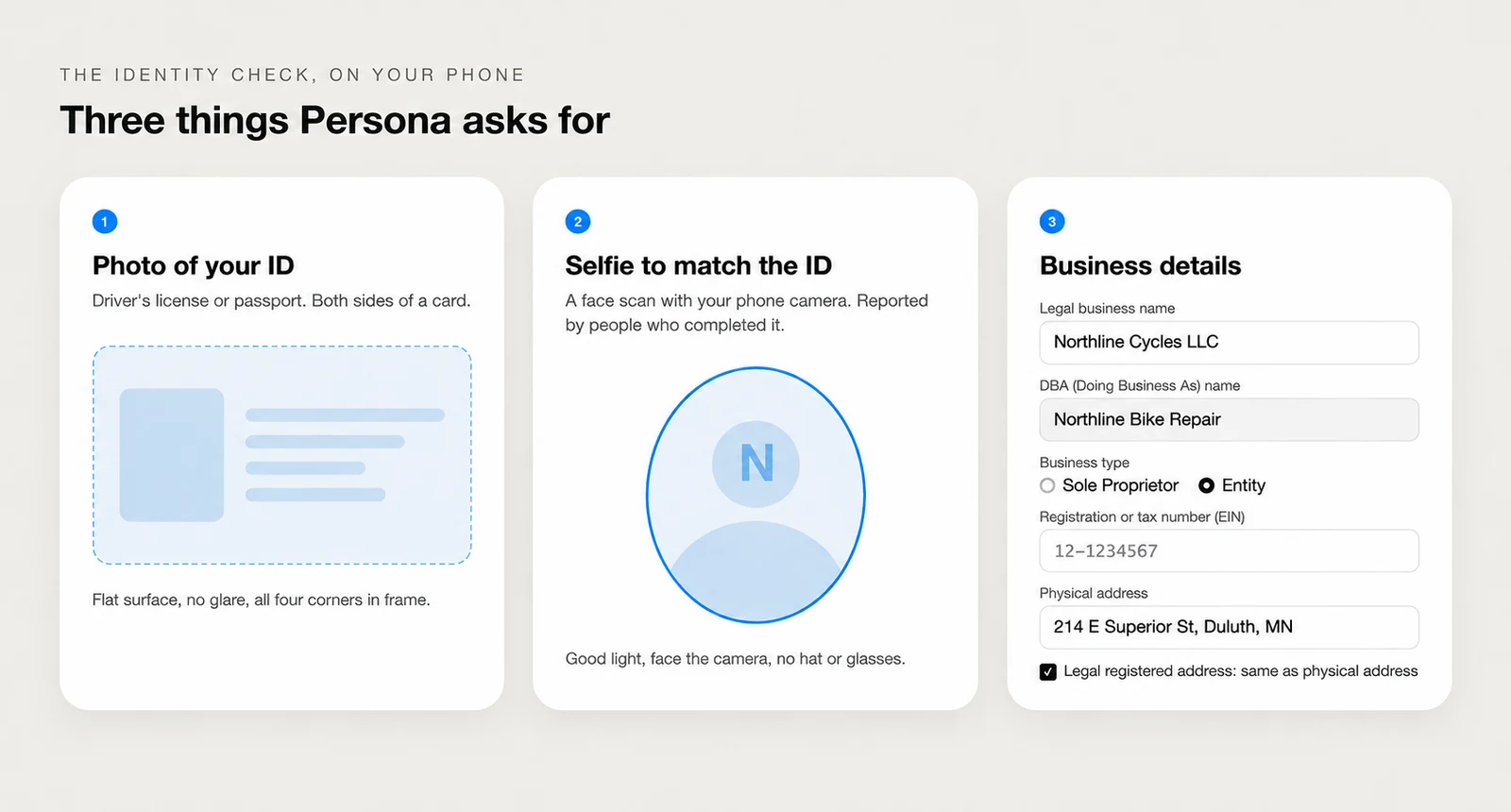
What the check asks for, as reported in November 2026. The form has already changed once since launch.
Have an owner or officer whose name is on the business do this. OpenAI's rule is that you must own the business or be authorized to represent it, and the check ties the profile to one specific person's ID. An employee or an agency doing it creates a problem you will have to untangle later.
Step 6: Wait for the second review
OpenAI reviews the Persona submission and emails a decision. Reports run from near instant to the next day. Submitting is not the same as being approved, and the locked features stay locked until the email arrives.
How you know it worked
- The blue check. OpenAI is explicit: "Claiming your business alone doesn't give its profile a verified badge. The verified badge, shown as a blue check, appears after your Persona verification is approved."
- An approval email from OpenAI.
- The verification prompt is gone from the overview.
- Editing and insights work, and the tiles show numbers instead of dashes.
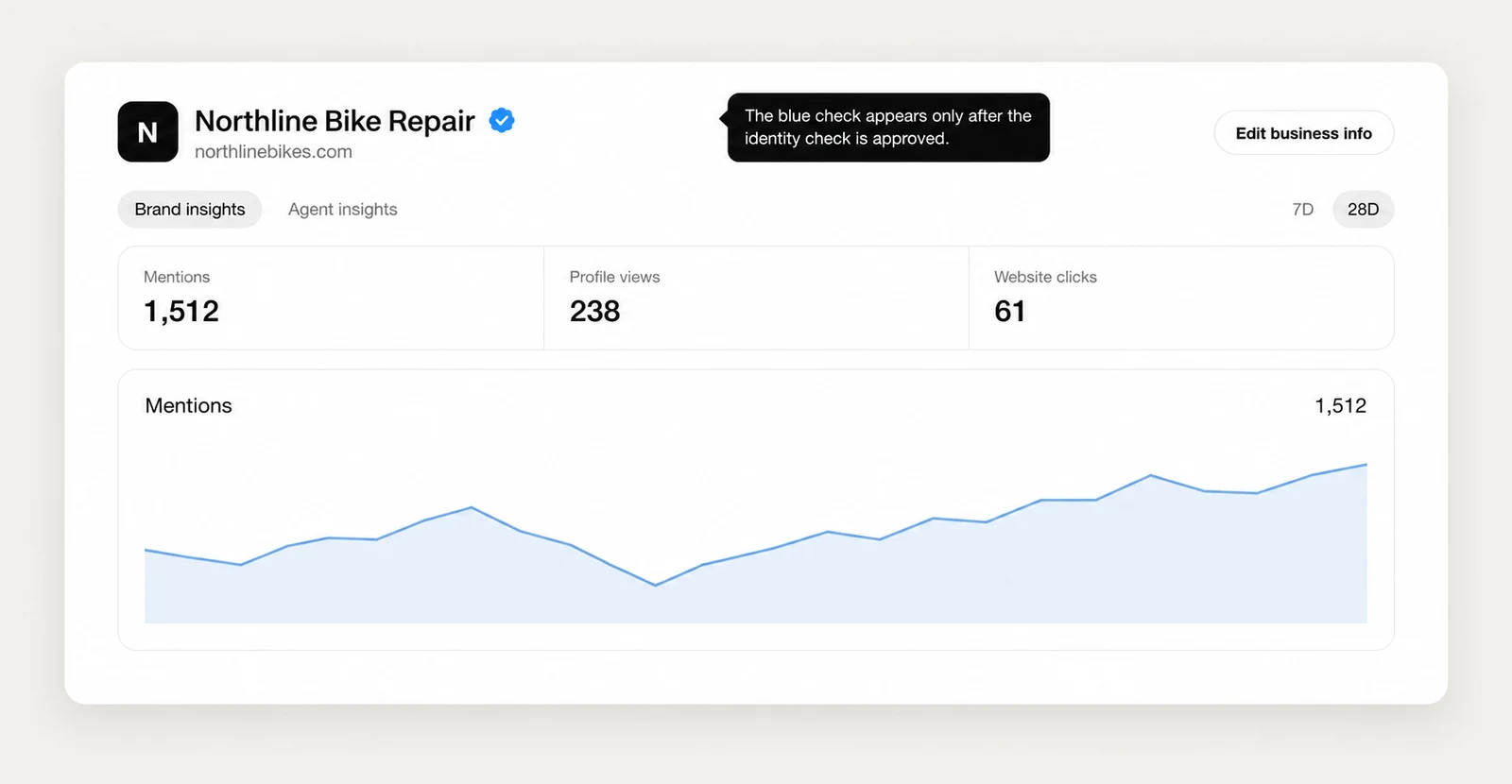
Sample business with made-up numbers.
One known glitch: after you submit the identity check, the dashboard can keep showing the verification prompt as if you never started. Wait for the email before trying again.
What to do once you are verified
- Fix the basics first. Website, description, category. Every change is reviewed before it publishes, so expect a delay. The description is reported to cap at about 300 characters, so write it like a one-line pitch.
- Read the insights carefully. For a local business, a mention counts when ChatGPT shows a result for that location. For an online business it only counts when ChatGPT references your website. A blank tile is not a zero. OpenAI says it can mean you are below the reporting threshold.
- Add your team the right way. The admin who claimed the business can invite teammates and grant an agency access. Everyone uses their own ChatGPT account.
- Make sure ChatGPT can read your site. If your robots.txt or firewall blocks OpenAI's search crawler, ChatGPT is working from secondhand information no matter how tidy your profile is.
- If you sell online, look at the product feed and Business Agent. These are the parts that go beyond a listing. The agent is limited to US ecommerce and online service businesses, and OpenAI's agent policy bars it from collecting health details or giving advice that needs a professional license.
When something goes wrong
| Problem | Fix |
|---|---|
| The phone code never comes | Try the automated call instead of text, or switch to the domain method. Do not leave the flow. |
| DNS will not verify | Compare host and value with what ChatGPT shows. Look for the doubled domain, an expired record, or a record added to the wrong domain. |
| Identity check fails with no reason | Follow the email. If you get a retry, change one thing: it is usually the legal name, address or tax number not matching the registration. |
| Brand name is not your legal name | Registered entity in the legal name field, brand in doing business as. |
| The wrong account made the claim | No transfer is documented. Contact OpenAI Support, and pick the account up front next time. |
| Several locations | There is no parent profile. Claim each location separately. |
| Edits are not showing | Changes are reviewed first, and ChatGPT can still pull from other sources. |
For anything else, OpenAI asks you to contact Support with the step you were on, the error message and a screenshot with anything sensitive removed.
Read this before you claim
A few terms are easy to skip and impossible to undo. All of these come from OpenAI's terms and help page.
- You cannot delete a published profile. Support cannot delete, unpublish or hide it. Only unpublished drafts can be removed.
- Your basic details are licensed forever. The license to show your name, address, contact details, category, hours and website is "perpetual and irrevocable."
- You do not get the final say. OpenAI "may supplement, edit, or replace information using other sources or decline to display information you submit."
- ChatGPT may call you. Using Business Hub means agreeing that OpenAI's assistant can call your business on behalf of its users.
None of these is a reason not to claim, since the listing exists either way. They are reasons to decide on purpose which account owns it and who goes through the ID check.
Quick answers
Does it cost anything? Not at launch. OpenAI lists no fee and says you do not need an Ads account or an Enterprise agreement. People report a free ChatGPT account was enough. OpenAI has not said whether that changes.
How long does it take? There are two reviews and OpenAI only says the time varies. Early reports run from under a minute to several days for each. Budget a few days.
Do I have to upload my EIN letter? Probably not in the US, where people report typing the EIN and legal name. Uploads have been reported in some cases elsewhere. Have the letter open so you can copy it exactly.
Will this make ChatGPT recommend me more? OpenAI says no promise comes with it. You get accurate details, a badge and data.
Can my agency or a contractor do it for me? They can help, but the profile should live in an account the business owns, and the ID check needs a real owner or officer. Claim and verify yourself, then invite them from Business Hub.
My business is not in the search results. Now what? Local businesses can only claim an existing US listing for now. Do not create an online-only profile as a workaround. Make sure your website, Google profile and directories all agree on your details, then check back.
The short version
Claiming takes about an hour of actual work spread over a few days of waiting, and it is worth doing now while it is free and the listing is still mostly whatever OpenAI scraped together. Use an account the business owns, have an owner do the ID check, use the DNS method if you can, and read the four terms above before you click claim.
Business Hub is in beta and changing week to week. I will update this as OpenAI changes the process.
Dispatches
A note when something ships or when there is something worth reading.